Week 5: A New Architecture - Product of Programmatic Experts (PoE)
After initial explorations with a Mixture of Experts (MoE) architecture last week, it became apparent that the approach was not well-suited for generating dynamic Tölvera sketches. It was alright…but basically ended up with a lot of having to create so many different experts in a deterministic way, it essentially ruined the reason for using natural language in the first place. While modular in theory, the reliance on rigid JSON schemas and the architectural mismatch between Python-level orchestration and the Taichi runtime introduced a ton of implementation challenges that I met along the way. Consequently, this week’s work pivoted to a Product of Programmatic Experts (PoE) system, which turned out to be a more flexible and powerful architecture and will probably stick with this going forward.
The code for this week can be seen here and the demo file is poe_demo.py.
The Shift to a Force-Based, Dynamic System
The new PoE architecture represents a pretty significant shift in design philosophy, especially from the arch digram you can see from last week. Instead of attempting to generate monolithic scripts for the whole thing or individual experts that had to generate their entire behavior, the system now synthesizes small, independent “expert” functions. Each expert is a self-contained @ti.func that calculates a specific force (e.g., gravity, replusion, etc). These forces are then aggregated and applied to the particles within a single, main @ti.kernel.
We found this design to offer the following advantages:
- Composability: Behaviors can be dynamically added, removed, and weighted in real-time without requiring a full regeneration of the simulation (wayyyy better than week 2 and 3 😅).
- Performance: The generated code is 100% Taichi-native (
@ti.funcand@ti.kernel), which leverages the compute power of the GPU and avoids Python-scope operations in the main loop (this was a bane of my existence this week). - Flexibility: This approach removes the constraint of predefined JSON schemas. The LLM can generate any valid Taichi function, which enables a virtually infinite variety of behaviors. We used a lot of templates previously, and besides some structure within the demo itself
The Two-Step Synthesis Process
A primary technical obstacle I encountered was a fundamental limitation in Taichi’s compilation model. A @ti.kernel defined dynamically in memory via exec() cannot have its source code located by the compiler during the optimization pass (or so I found out…). This resulted in the Cannot find source code for object error. To resolve this, I implemented a two-step synthesis process, orchestrated by the system’s synthesizer classes:
- Synthesize Expert (
@ti.func): Given a natural language description like “particles fall downwards,” thePoEExpertSynthesizerprompts the LLM to generate a single@ti.func. The prompt strictly enforces the function signaturedef expert_NAME(pos: ti.math.vec2, vel: ti.math.vec2, mass: ti.f32) -> ti.math.vec2:, to ensure that every expert is a standardized, interchangeable component that receives particle state directly and returns a force vector. - Regenerate Integration Kernel (
@ti.kernel): After a new expert is synthesized, its code is added to a collection. The system then immediately generates a new, all-encompassing@ti.kernelnamedapply_all_experts. The prompt for this step provides a structural template, instructing the LLM to generate the full kernel logic, including the particle loop, state retrieval from Tölvera’s data structures (tv.p.field[i]), weighted accumulation of forces from all active experts, velocity and position integration, and screen boundary logic. This plans to be updated in the future, but for right now this is taking the place of the hardcoded template structure that we had previously.
The final solution involves concatenating the code for all active @ti.func experts with the newly synthesized @ti.kernel code into a single string. This complete script is then compiled into a code object using compile() and run in an isolated namespace via exec(). The in-memory source code is also added to Python’s linecache, allowing tracebacks to point to the correct lines within the dynamically generated code for the Logger which helped with figuring out what was wrong.
Visualizing the Flow
To clarify this process, I created a diagram that illustrates the entire data flow, from the initial user prompt to the final execution of the Taichi kernel.
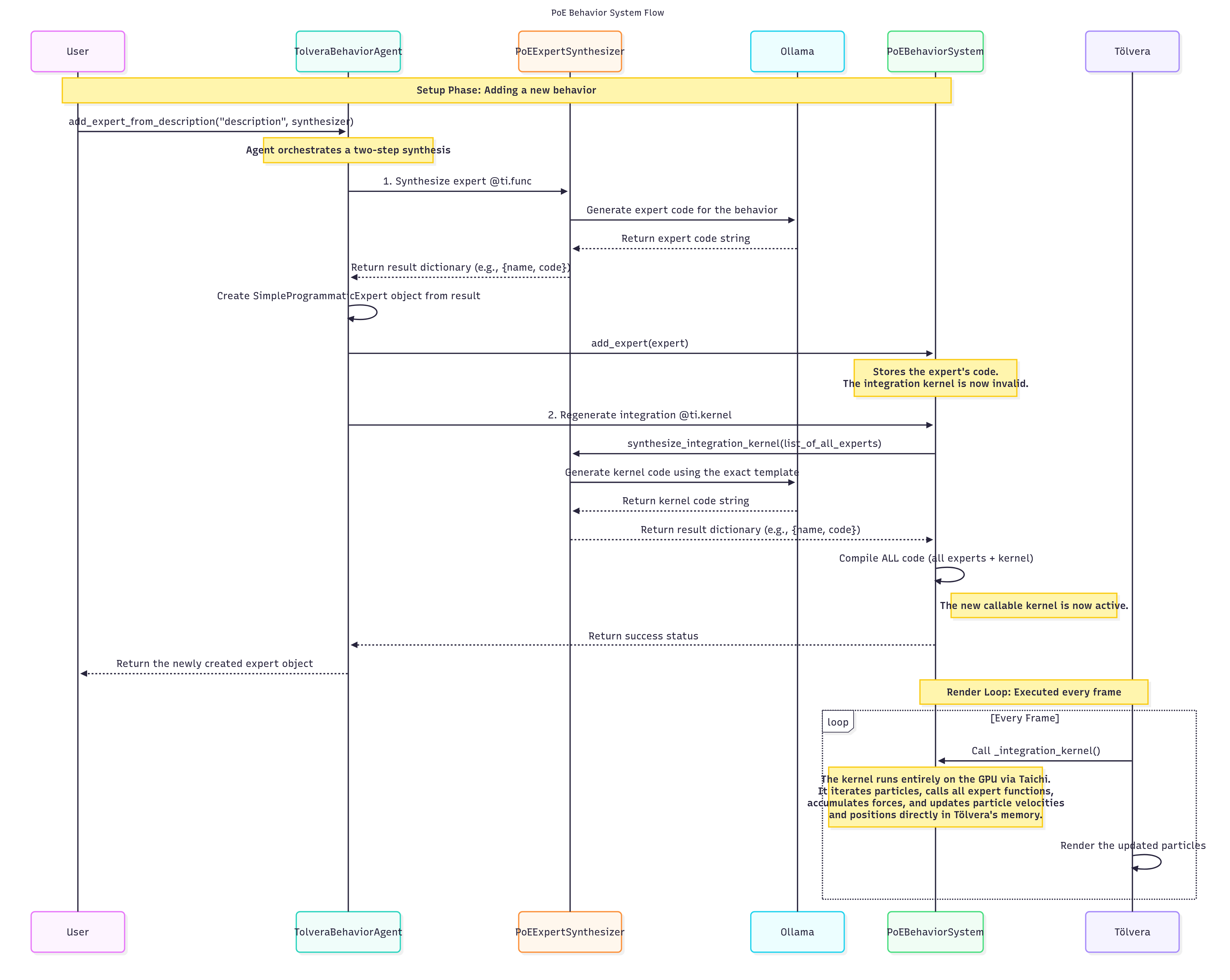
The implementation of this system involved overcoming several technical hurdles which I document below.
- The Taichi Compilation Error: We talked about this one before, but this was a big error that took me a good day to figure out.
- Performance Bottlenecks: Early iterations of the system showed severe performance bottlenecks. We’re talking my computer crashing every single time I ran a generated script. And then restart…see what the problem was…etc. After analysis, the LLM-generated code contained several performance anti-patterns, such as improper kernel structure, O(n²) particle interaction complexity, and inefficient memory access patterns. The solution was to enforce a strict, performant structure for the integration kernel via prompting, ensuring proper data access (
tv.p.field[i]) and avoiding operations that cause CPU-GPU synchronization. This was my deep dive into more Taichi than anything. - LLM Reliability: Asstering the LLM consistently generates syntactically correct and logically sound Taichi code required a multi-layered approach for it to work with both large and small parameter models. I have iteratively refined the system prompts to include detailed instructions, few-shot examples (e.g.,
expert_gravity,expert_swirl), and explicit constraints. I also implemented a pre-compilation validation step that uses some pretty terse regex to check the generated code for required decorators (@ti.func,@ti.kernel) and to block unsafe operations (e.g.,import,exec). S/O to Piotr for the assistance with some of his code for helping guide me on the right path for grabbing this code!
Demonstrations of Generated Experts
To illustrate the flexibility and power of the PoE architecture, here are a few examples of dynamically generated experts and their corresponding behaviors:
Demo 1: Gravity
| User Description | Generated Expert Code | Included Experts |
| particles fall downward strongly |
|
|
Demo 2: Attraction to Center
| User Description | Generated Expert Code | Included Experts |
| particles are attracted to the center of the screen and move quickly |
|
|
Demo 3: Movement to the Right
| User Description | Generated Expert Code | Included Experts |
| particles move to the right |
|
|
Demo 4: Repulsion from Center
| User Description | Generated Expert Code | Included Experts |
| particles rapidly repel the center of the screen |
|
|