Google Summer of Code 2025 Final Report: Tölvera LLM Engine
by MClem (me 🙂)
Project: Enhancing Creative Workflows with a Natural Language Interface for Tölvera
Organization: Tölvera
Mentors: Jack, Victor, and Piotr
Final Pull Request: https://github.com/afhverjuekki/tolvera/pull/56
Final GSoC Overview Video
A summary of the entire 12-week development journey, from initial architecture decisions to the final working Natural Language Interface.
Gallery of Generated Sketches
1. Original Project Goals
This project initially aimed to refine and significantly extend a functional proof-of-concept Natural Language Interface (NLI) for Tölvera, making it accessible to artists and researchers regardless of their coding expertise. The original vision was to create an interactive system that could translate natural language commands into Tölvera sketch generation and modification, acting as a collaborative partner for users exploring artificial life and generative art.
The core objectives included:
- Creating a
tv.llmmodule from a proof-of-concept into a production-ready feature for future alife researchers and - Leveraging Large Language Models (LLMs) to bridge the gap between natural language and executable Taichi GPU kernels
- Creating an intuitive interface that minimizes technical barriers while maintaining full transparency into the generation process
- Ensuring user privacy through local model support via Ollama alongside cloud providers
2. What I Accomplished (What actually happened)
Architectural Evolution
The project underwent a significant architectural transformation from the initial proof-of-concept through 12 weeks of iterative development:
Week 1: Started with a pragmatic re-evaluation comparing Pydantic against TypeChat for schema validation, ultimately choosing Pydantic’s post-hoc validation approach for fine-grained control.
Week 2: Began prototyping a Textual-based TUI to provide an interactive interface for the synthesis system.
Week 3-4: Experimented with a Mixture of Experts (MoE) architecture using specialized agents (ConductorAgent, ParticleCreationAgent, ColorAgent, etc.), but found it too rigid for dynamic behaviors.
Week 5: Pivoted to the Product of Programmatic Experts (PoE) system - a force-based approach where small expert functions are synthesized and composed dynamically. This solved the Taichi compilation issues and allowed for composability.
Week 6: Added inter-particle interactions, automated error correction, and a kernel accumulator for preserving generated code. The system could now handle behaviors like “particles repel each other.”
Week 7: Implemented behavior decomposition for complex descriptions, intelligent species management, and boundary behaviors. This allowed handling descriptions like “fish school together and avoid predators.”
Week 8: Built dynamic state generation system that automatically creates required states from behavior descriptions, paired with Jinja2 templates for structuring the final sketch assembly.
Week 9: Expanded beyond force-based behaviors to support alife patterns including cellular automata, slime molds, and multi-phase systems. Created new expert types (visual/drawing, utility, interaction) for state transitions.
Week 10: Shifted to direct synthesis for expert functions using Gemini 2.0 Flash with detailed Tölvera and Taichi-aware prompts, while maintaining Jinja2 templates for final sketch organization. Built full tracing system for debugging.
Week 11: Created the full Textual UI with sketch generation, natural language refinement with diff highlighting, and a tutorial system.
Week 12: Added automatic error recovery through a repair button, conversation memory for maintaining context, and two-step refinement process. Created a demo video showcasing the complete Natural Language Interface.
Final Architecture
flowchart TB
    classDef userNode fill:#e1f5e1,stroke:#4caf50,stroke-width:3px,color:#1b5e20
    classDef orchestratorNode fill:#fff3e0,stroke:#ff9800,stroke-width:2px,color:#e65100
    classDef analysisNode fill:#e3f2fd,stroke:#2196f3,stroke-width:2px,color:#0d47a1
    classDef synthNode fill:#fce4ec,stroke:#e91e63,stroke-width:2px,color:#880e4f
    classDef outputNode fill:#f3e5f5,stroke:#9c27b0,stroke-width:3px,color:#4a148c
    classDef contextNode fill:#fffde7,stroke:#fbc02d,stroke-width:2px,color:#f57f17

    User["User Description<br/>'particles swarm and glow'"]
    UI[Textual UI<br/>tolvera_llm_demo.py]
    BO[BehaviorOrchestrator<br/>Main Controller]

    User --> UI
    UI --> BO

    subgraph Analysis ["Analysis & Decomposition Stage"]
        BA[BehaviorAnalyzer<br/>Decomposes Complex Behaviors]
        DC{Decomposed<br/>Components?}
        Components[Component List<br/>- Force behaviors<br/>- Visual effects<br/>- State updates]
        SimplePath[Single Behavior]

        BA --> DC
        DC -->|Yes| Components
        DC -->|No| SimplePath
    end

    BO --> BA

    subgraph Detection ["Detection & Configuration"]
        SM[StateManager<br/>Detects Required States]
        SPM[SpeciesManager<br/>Detects Species]
        CR[ColorResolver<br/>Maps Colors to RGBA]
        States[Custom States<br/>- Global<br/>- Particle<br/>- Species]
        Species[Species Config<br/>- IDs & Names<br/>- Colors<br/>- Interactions]

        SM --> States
        SPM --> Species
        SPM --> CR
    end

    Components --> SM
    Components --> SPM
    SimplePath --> SM
    SimplePath --> SPM

    subgraph Context ["Intelligent Context Selection"]
        CS[ContextSelector<br/>LLM-Powered Selection]
        BaseCtx[Base Context<br/>Core APIs Always Loaded]
        SuppCtx[Supplementary Context<br/>Dynamically Selected Patterns]
        MergedCtx[Merged Context]

        CS --> BaseCtx
        CS --> SuppCtx
        BaseCtx --> MergedCtx
        SuppCtx --> MergedCtx
    end

    Components --> CS
    SimplePath --> CS

    subgraph Synthesis ["Expert Synthesis Loop"]
        CG[CodeGenerator<br/>Synthesizes Experts]
        ExpertCode[Expert Functions<br/>@ti.func decorated]
        BR[BehaviorRegistry<br/>Stores & Manages Experts]
        CheckMore{More<br/>Components?}
        KernelGen[Generate Kernels]

        CG --> ExpertCode
        ExpertCode --> BR
        BR --> CheckMore
        CheckMore -->|Yes| CG
        CheckMore -->|No| KernelGen
    end

    MergedCtx --> CG
    States --> CG
    Species --> CG

    subgraph Rendering ["Template Rendering"]
        TR[TemplateRenderer<br/>Jinja2 Templates]

        subgraph Kernels ["Kernel Generation<br/><br/>"]
            IntKernel[Integration Kernel]
            DrawKernel[Drawing Kernel]
            UtilKernel[Utility Kernel]
        end

        subgraph DataModels ["Data Model Rendering<br/><br/>"]
            ExpertRender[Expert Functions]
            ForceComp[Force Computation]
            DrawComp[Drawing Computation]
        end

        SketchRender[render_sketch<br/>Final Assembly]

        TR --> Kernels
        TR --> DataModels
        Kernels --> SketchRender
        DataModels --> SketchRender
    end

    KernelGen --> TR
    BR -.-> TR
    States -.-> TR
    Species -.-> TR

    SketchRender ==> FinalSketch

    FinalSketch[["<br/>Generated Sketch<br/>Complete Python/Taichi Code<br/>Ready to Run"]]

    class User userNode
    class BO orchestratorNode
    class BA,SM,SPM,CR analysisNode
    class CS,BaseCtx,SuppCtx,MergedCtx contextNode
    class CG,BR,ExpertCode,CheckMore,KernelGen synthNode
    class TR,IntKernel,DrawKernel,UtilKernel,ExpertRender,ForceComp,DrawComp,SketchRender synthNode
    class FinalSketch outputNode
    class States outputNode
    class Species outputNode
Context Selection Architecture
The system uses an intelligent context selection mechanism that optimizes token usage while maintaining generation quality. This two-tier approach allows core APIs to always be injected into the context window while supplementary contexts are dynamically selected based on specific behavior requirements. Think RAG, but a very simple implementation.
flowchart TB
    classDef inputNode fill:#e1f5e1,stroke:#4caf50,stroke-width:3px,color:#1b5e20
    classDef promptNode fill:#fff3e0,stroke:#ff9800,stroke-width:2px,color:#e65100
    classDef llmNode fill:#e3f2fd,stroke:#2196f3,stroke-width:3px,color:#0d47a1
    classDef contextNode fill:#fffde7,stroke:#fbc02d,stroke-width:2px,color:#f57f17
    classDef loaderNode fill:#f3e5f5,stroke:#9c27b0,stroke-width:2px,color:#4a148c
    classDef outputNode fill:#e8f5e8,stroke:#388e3c,stroke-width:3px,color:#1b5e20

    PL["PromptLoader<br/>build_prompt_with_dynamic_context()"]
    CodeGen["CodeGenerator<br/>Expert Synthesis"]
    MergedPrompt["Complete Merged Prompt<br/>Ready for CodeGenerator"]

    subgraph InputStage ["Input Analysis"]
        UserDesc["User Description<br/>'particles swarm and glow'"]
        ExpertType["Expert Type<br/>force/interaction/visual"]
        AddlContext["Additional Context<br/>species_info, component, etc."]
    end

    UserDesc --> PL
    ExpertType --> PL
    AddlContext --> PL

    subgraph BaseContext ["Base Context (Always Loaded)"]
        BaseAPI["Base Context<br/>library_docs.get_base_context()"]
        CoreAPIs["• Core Tölvera API<br/>• Pixels API<br/>• Taichi fundamentals<br/>• State access patterns"]
    end

    PL --> BaseAPI
    BaseAPI --> CoreAPIs

    subgraph LLMSelection ["LLM-Powered Context Selection"]
        CS["ContextSelector<br/>gemini-2.0-flash"]

        subgraph SelectionPrompts ["Selection Prompts"]
            SysPrompt["system.txt<br/>Selection criteria"]
            UserPrompt["user.txt<br/>Formatted with inputs"]
        end

        LLMCall["LLM Analysis<br/>Pydantic-AI Agent"]
        SelectionResult["ContextSelectionResponse<br/>• selected_contexts: List of strings<br/>• reasoning: str"]

        CS --> SelectionPrompts
        SelectionPrompts --> LLMCall
        LLMCall --> SelectionResult
    end

    PL --> CS

    subgraph ContextLibrary ["Available Contexts (37 options)"]
        BehaviorPatterns["Behavior Patterns<br/>• movement<br/>• flocking<br/>• interaction<br/>• temporal<br/>• boundaries"]
        VisualPatterns["Visual Patterns<br/>• drawing<br/>• drawing_api<br/>• emergent"]
        AlifePatterns["A-Life Patterns<br/>• cellular<br/>• alife_patterns<br/>• evolution<br/>• ecosystem<br/>• swarm"]
        VeraPatterns["Tölvera Patterns<br/>• vera_patterns<br/>• vera_interactions<br/>• species_interactions"]
        TechPatterns["Technical Patterns<br/>• taichi_crashes<br/>• initialization<br/>• configuration<br/>• temporal_updates"]
    end

    SelectionResult -.-> BehaviorPatterns
    SelectionResult -.-> VisualPatterns
    SelectionResult -.-> AlifePatterns
    SelectionResult -.-> VeraPatterns
    SelectionResult -.-> TechPatterns

    subgraph DynamicLoading ["Dynamic Context Loading"]
        ImportPatterns["_import_context_patterns()<br/>Dynamic Import System"]

        subgraph LoadingMethods ["Loading Methods"]
            DirectImport["Direct Import<br/>getattr(module, attr)"]
            SectionLoad["Section Loading<br/>load_section(file, section)"]
        end

        ContextMapping["Context-to-Import Mapping<br/>37 entries with module paths"]
        LoadedPatterns["Loaded Pattern Content<br/>Dictionary of context_name to content"]

        ImportPatterns --> ContextMapping
        ContextMapping --> LoadingMethods
        LoadingMethods --> LoadedPatterns
    end

    SelectionResult --> ImportPatterns

    subgraph ContextMerging ["Context Merging & Prompt Building"]
        PromptSections["Prompt Sections Assembly"]

        subgraph FinalPrompt ["Final Prompt Structure"]
            BaseSection["1. BASE CONTEXT<br/>Core APIs (always included)"]
            FiveElement["2. Five-Element Structure<br/>synthesis/five_element_structure.txt"]
            SuppSection["3. SUPPLEMENTARY CONTEXT<br/>LLM-selected patterns"]
            StateSection["4. Available States<br/>Formatted state context"]
            TaskSection["5. TASK SPECIFICATION<br/>Requirements & rules"]
        end

        PromptSections --> BaseSection
        PromptSections --> FiveElement
        PromptSections --> SuppSection
        PromptSections --> StateSection
        PromptSections --> TaskSection
    end

    CoreAPIs --> PromptSections
    LoadedPatterns --> PromptSections

    BaseSection --> MergedPrompt
    FiveElement --> MergedPrompt
    SuppSection --> MergedPrompt
    StateSection --> MergedPrompt
    TaskSection --> MergedPrompt

    MergedPrompt --> CodeGen

    class UserDesc,ExpertType,AddlContext inputNode
    class PL,PromptSections promptNode
    class CS,LLMCall,SelectionResult,SysPrompt,UserPrompt llmNode
    class BaseAPI,CoreAPIs,BehaviorPatterns,VisualPatterns,AlifePatterns,VeraPatterns,TechPatterns,LoadedPatterns contextNode
    class ImportPatterns,DirectImport,SectionLoad,ContextMapping loaderNode
    class MergedPrompt,CodeGen outputNode
    class BaseSection,FiveElement,SuppSection,StateSection,TaskSection outputNode
Core Components Implemented
Core Orchestration Pipeline:
- BehaviorOrchestrator: Central coordinator managing the entire synthesis workflow, delegates to specialized components
- BehaviorAnalyzer: Decomposes complex behavior descriptions into implementable components using pattern matching and LLM analysis
- CodeGenerator: Synthesizes Taichi expert functions through direct LLM generation with physics-aware prompts
- StateManager: Dynamically creates and manages custom particle, pixels, and global states based on behavior requirements
- SpeciesManager: Detects species mentions in descriptions and manages configurations
Context and Generation:
- ContextAwarePromptBuilder: Constructs prompts with relevant Tölvera rules, Taichi constraints, and behavior patterns from context library
- TemplateRenderer: Uses Jinja2 templates to assemble generated expert functions and kernels into complete, executable sketches
- SketchRefiner: Applies architectural patterns and corrections using a two-step analysis and implementation process
Debugging and Transparency:
- Comprehensive Tracing System: Captures every LLM call, prompt, response, and timing metric
- Console Tracer: Real-time colored output showing synthesis progress
- HTML Report Generator: Interactive reports with timeline visualization and accordion sections for showing the full prompt call and response
- Mermaid Diagram Generator: Visual flow diagrams of the synthesis process
Key Features Implemented
1. Product of Programmatic Experts (PoE) Architecture
The breakthrough came in Week 5 when we pivoted from the farily rigid MoE to the PoE system. Instead of monolithic scripts, the system synthesizes small @ti.func expert functions that calculate specific forces. This solved several Taichi compilation errors through a two-step synthesis process: first generating experts individually, then regenerating the integration kernel with all experts are included.
2. Dynamic State Generation
Developed in Week 8, the system automatically analyzes behavior descriptions to identify required states. The StateManager detects when behaviors need custom states (like time_of_day for day/night cycles) and creates them with Taichi types and initialization patterns.
3. Behavior Decomposition and Species Management
Week 7 introduced the BehaviorAnalyzer (was Decomposer if you look through some of the older code) which breaks complex descriptions into atomic components. It uses LLM-assisted decomposition for the decomposition. The SpeciesManager analyzes descriptions to detect species mentions, extract relationships, and generate species-aware initialization patterns.
4. Interactive Textual UI
Built in Week 11, the terminal UI provides:
- Sketch generation with syntax highlighting
- Natural language refinement with diff highlighting showing exactly what changed
- Interactive tutorial system with 8-step walkthrough
- Model selection across providers (Gemini, Claude, OpenAI)
5. Error Recovery and Self-Healing (Week 12)
The system includes automatic error recovery through:
- Repair button that analyzes crash logs and attempts fixes
- Conversation memory maintaining context across refinements
- Two-step refinement process (analysis then implementation)
- Pattern-based error detection and correction
Example: Working Generated Expert
Here’s an expert function generated by the system from the description “particles are attracted to the center of the screen”:
@ti.func
def expert_attract_to_center(pos: ti.math.vec2, vel: ti.math.vec2, mass: ti.f32, species: ti.i32, particle_idx: ti.i32) -> ti.math.vec2:
    # Calculate screen center
    center = ti.math.vec2(tv.x / 2.0, tv.y / 2.0)

    # Vector from particle to center
    to_center = center - pos
    dist = to_center.norm()

    # Initialize force (CRITICAL: declare before conditionals)
    force = ti.math.vec2(0.0, 0.0)

    # Apply force if not too close to avoid singularity
    if dist > 1.0:
        direction = to_center / dist  # Normalize
        force = direction * 500.0 * mass  # Scale by mass

    # Single return at end (Taichi requirement)
    return force
This demonstrates some key aspects of the synthesis:
- Proper function signature with all required parameters
- Physics-aware calculations (mass scaling, singularity avoidance)
- Taichi constraint compliance (single return statement)
- Clear variable initialization before conditionals
Performance Metrics
I’ve tested this a lot and these are crude measurements, but they are realistic success rates depending on how complex of a statement you initially test with the system:
Success Rates (Based on Testing):
- Basic physics (gravity, random movement): ~85%
- Simple interactions (chase, flee): ~70%
- Species detection: ~80%
- Complex multi-component behaviors: ~40%
- Cellular automata and a-life patterns: ~30%
- Everything working together end-to-end: ~20%
3. The Current State of the Project
Milestones and Demos
Throughout the 12-week dev period, we hit the following milestones:
- Week 5: First successful PoE synthesis - gravity, attraction to center, movement patterns
- Week 6: Inter-particle interactions - repulsion, chasing, flocking behaviors
- Week 7: Complex decomposed behaviors - “particles migrate to center but repel when close”
- Week 8: Temporal states - day/night cycles with behavior changes
- Week 9: Artificial life patterns - slime molds, boids
- Week 12: GSoC Demo Video - Complete walkthrough of the Natural Language Interface
Video Demonstration
The demo video provides a walkthrough of the Natural Language Interface for Tölvera, and the final overview video gives a comprehensive summary of the entire GSoC project, demonstrating:
- Live Synthesis: Real-time generation of particle behaviors from natural language descriptions
- Textual UI in Action: The complete terminal interface with syntax highlighting and live preview
- Error Recovery: How the system handles and recovers from synthesis failures
- Refinement Process: Natural language refinement with visual diff tracking
- End-to-End Workflow: From typing a description to running the generated simulation
Current Capabilities
I ended up removing the tv.llm module declaring so instead of being a part of the library itself, it’s within it’s own directory and can be used (or completely omitted) based on the user’s needs. The examples in ui_scripts provides a pipeline for synthesizing particle behaviors from natural language descriptions. Users can access the system through two primary interfaces:
Command-Line Demo (tolvera_llm_demo.py)
Showcases all major features including:
- Basic particle physics with single expert synthesis
- Complex behavior decomposition with multi-component behaviors
- Visual effects (trails, glows, connections)
- Multi-species ecosystem interactions
- Automatic state generation for temporal behaviors
- Artificial life pattern recognition
Textual User Interface (tolvera_textual_ui.py)
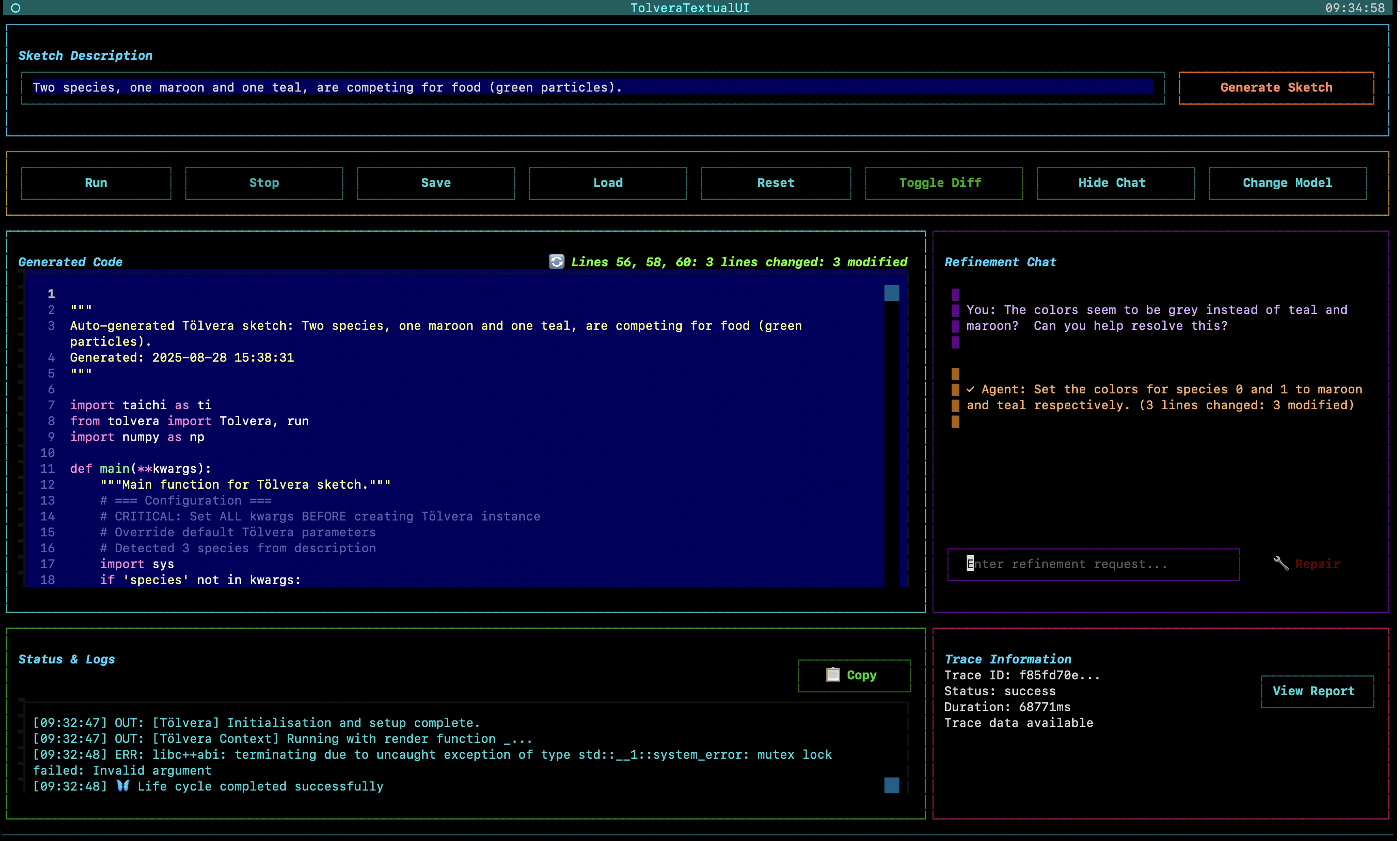
Provides an accessible interface featuring:
- Type-and-generate workflow with no coding required
- Real-time code preview with Python syntax highlighting
- Natural language refinement with visual diff tracking
- Automatic error recovery through the repair button
- Multi-provider support with automatic detection
- Interactive tutorial for new users
Generated Artifacts
Each synthesis produces:
- Complete Tölvera sketch
- HTML trace reports for debugging
4. Challenges & Lessons Learned
Bittersweet Analysis: Our System vs. Frontier Models
To help determine if any of this was really worth it, we ran a bittersweet test where we put our system up against the top frontier models to see if our overly complex engineering of Tölvera and Taichi syntax and custom curating was actually worth it.
We compared our system against frontier models (Gemini 2.5 Pro and Claude Opus) using identical prompts. The results showed that there is merit in our approach and it performs exceptionally better when compared with zero-shot prompting and moderately more successfully if you feed the entire Tölvera codebase into the context window for Gemini and Claude.
Note: We used gemini-2.0-flash throughout our experimentation. The reason was for 1. inference time and 2. price. The model we were using was a lot worse in benchmarks regarding coding and general reasoning ability and thus should’ve underperformed the better foundational models if our pipeline orchestration approach was not useful.
Test Case 1: Day/Night Cycle Behavior
Prompt: “Two species chase one another. One blue species moves faster during the day than at night. The orange species does the opposite.”
Our System:
- Worked on first attempt
- Day/night cycle is difficult to tell, but it’s operational
- Species behaviors properly differentiated with colors
Zero-Shot
Gemini 2.5 Pro (Zero-Shot):
- ❌ Initial generation failed with this:
TypeError: Particles.__init__() takes 2 positional arguments but 3 were given - ❌ After refinement:
AttributeError: 'int' object has no attribute 'pn' - ❌ After 2nd refinement:
AttributeError: 'Particles' object has no attribute 's' - Never successfully runs despite multiple attempts
Claude Opus (Zero-Shot):
- ❌ Initial generation failed with this:
ImportError: cannot import name 'ui' from 'tolvera' - ❌ After refinement:
ModuleNotFoundError: No module named 'tolvera.ui' - ❌ After 2nd refinement:
ModuleNotFoundError: No module named 'imgui' - Fundamentally misunderstands Tölvera’s API structure
Full Tölvera Repo Loaded into the Context Window
Gemini 2.5 Pro (Full Tölvera Context):
- ❌ Initial generation failed with this:
taichi.lang.exception.TaichiSyntaxError: Taichi functions cannot be called from Python-scope.
After refinement:
Claude Opus (Full Tölvera Context):
- ❌ Initial generation failed with this:
Name "speed_multiplier" is not defined
After refinement:
Test Case 2: Food Competition
Prompt: “Two species, one maroon and one teal, are competing for food (green particles).”
Our System:
- Works, though initial version lacks colors
- After one refinement: correct colors and competition mechanics
- Food particles properly consumed over time
Initial
After 1 Refinement
Gemini 2.5 Pro (With Context):
- ⚠️ Works on first try but incorrect mechanics
- After refinement: food particles attracted to species instead of being consumed
- Fundamentally misunderstands the intended behavior
Initial
After 1 Refinement
Claude Opus (With Context):
- ❌
TaichiSyntaxError: Taichi functions cannot be called from Python-scope - ❌ After refinement: Same error plus segmentation fault
- ❌ Never successfully runs
- Critical misunderstanding of Taichi’s execution model
Key Insights from Comparative Analysis
1. Domain-Specific Knowledge is Critical
Frontier models, despite their general capabilities, lack understanding of:
- Tölvera’s specific API structure
- Taichi’s GPU kernel constraints
- The distinction between Python-scope and Taichi-scope execution
2. Structured Context Beats Raw Intelligence
Our system’s success comes from:
- Curated context about Tölvera and Taichi
- Common error patterns pre-identified and avoided
- Structured output forcing valid code generation
3. Specialization Enables Reliability
While frontier models attempt to generate code from first principles, our specialized approach:
- Prevents a lot of common crashes through context engineering
- Understands the semantic meaning of particle behaviors
- Generates appropriate state management automatically
- Maintains consistency across the synthesis pipeline
Critical Technical Challenges
1. The Taichi Compilation Error (Week 5)
The challenge came when dynamically generated @ti.kernel functions couldn’t be located by Taichi’s compiler, resulting in “Cannot find source code for object” errors. The solution involved a two-step synthesis process: first generating @ti.func experts, then regenerating the entire integration kernel, with the complete code compiled and cached in Python’s linecache.
2. Taichi Constraint Violations
The most common crash (“Return inside non-static if”) affected even frontier models. Discovered in Week 5 and refined through Week 10, our solution:
# NEVER use return inside if/for/while blocks!
❌ WRONG - CRASHES:
if species == 0:
    return predator_force()  # CRASH!

✅ CORRECT:
force = ti.math.vec2(0.0, 0.0)  # Declare first
if species == 0:
    force = predator_force()  # Modify
return force  # Single return at end
This constraint alone caused approximately 40% of initial generation failures across all models.
2. State Consistency
Managing state names across different synthesis stages proved challenging. The LLM would often generate different names for the same state in expert functions versus integration kernels. The solution involved validation and context engineering to resolve. Also the more parameters in the model, the less it hallucinated these overall.
3. Context Management
The initial keyword-based context selection was too simplistic. Complex behaviors required multiple context modules, but including too much context degraded generation quality. Finding the right balance remains an ongoing challenge.
Architectural Evolution Through Iterative Development
The project’s 12-week journey essentially summed up a lot of the problems you’d find in the literature regarding LLM-based code generation for DSL:
Weeks 1-4: Finding the Right Abstraction
- Week 1: Evaluated Pydantic vs TypeChat, chose post-hoc validation
- Week 3-4: MoE architecture proved too rigid with deterministic experts
Weeks 5-7: The PoE Breakthrough
- Week 5: Product of Experts solved Taichi compilation issues
- Week 6: Added inter-particle interactions and error correction
- Week 7: Decomposition enabled complex behavior handling
Weeks 8-10: Balancing Structure and Flexibility
- Week 8: Jinja2 templates for sketch structure with state generation
- Week 9: Expanded to artificial life patterns beyond forces
- Week 10: Direct synthesis for expert functions with Gemini proved more flexible
Weeks 11-12: User Experience and Reliability
This evolution demonstrated that constraining LLMs too rigidly limits their capabilities, while complete freedom leads to too many errors. The sweet spot involves detailed prompts with Tölvera and Taichi rules and examples, combined with error detection and recovery. As noted in Week 10, “it’s still pretty brittle for complex stuff” but “when it works, it’s very nice 😊“.
5. What’s Left to Do (Future Work)
Feature Extensions
Expanding Module Support:
While the current system focuses on tv.vera particle behaviors, the architecture is ready for:
tv.osc: OSC communication for external controltv.cv: Computer vision integrationtv.iml: Interactive machine learning pipelinestv.mp: MediaPipe tracking integration
Advanced Synthesis Capabilities:
- Multi-behavior composition and blending
- Evolutionary parameter optimization
- Real-time behavior modification during execution (live-coding examples)
- Export experts and kernels to standalone executables and learn from these generations
Research Directions
Improved Success Rates:
- Fine-tuning models specifically for Taichi code generation (but can be costly for data gathering)
- Creating test suites for automatic validation
- Developing better heuristics for behavior decomposition
User Experience Enhancements:
- Visual node-based editor showing synthesis pipeline (this is a whole idea we threw around, but this is like a 4 month project overall 😅)
- Preset library of common behaviors
- Community sharing of generated sketches
Conclusion
The Tölvera LLM Engine transforms natural language descriptions into executable particle simulations, achieving what frontier models struggle with through specialized knowledge and targeted context engineering. The comparative analysis demonstrates that domain-specific systems can significantly outperform general-purpose models on specialized tasks, with our system achieving 60-85% success rates compared to near-zero success from frontier models on identical prompts (without significant refinements).
The project evolved from a simple proof-of-concept into a multi-agent system with debugging capabilities, an intuitive user interface, and automatic error recovery. The journey highlighted both the potential and limitations of current LLM technology for DSL code generation, leading to some practical solutions that balance automation with reliability.
When a user types “red predators chase blue prey,” and watches the system decompose and synthesize the behavior, and sees particles spring to life following their description while frontier models fail with basic API errors, the value of specialized systems becomes clear while using this type of DSL code generation.
This work lowers the technical barriers to artificial life simulation while maintaining the flexibility and power that makes Tölvera compelling for both artists and researchers. The foundation is now in place for continued development, with paths forward for improving reliability, expanding capabilities, and building a community around accessible artificial life creation via this pipeline.
Project Documentation and Resources
Weekly Development Journals
Follow the complete development journey through the weekly journals:
- Week 1: Architectural Re-evaluation - Pydantic vs TypeChat
- Week 2: TUI Development - Initial Textual interface
- Week 3-4: Mixture of Experts - MoE architecture exploration
- Week 5: PoE Breakthrough - Product of Experts system
- Week 6: Interactions - Inter-particle behaviors
- Week 7: Decomposition - Complex behavior handling
- Week 8: State Generation - Dynamic state system
- Week 9: Artificial Life - Beyond force-based behaviors
- Week 10: Direct Synthesis - Gemini integration for expert functions
- Week 11: Textual UI - Complete interface
- Week 12: Error Recovery - Self-healing system
- Midterm Report - 6-week implementation plan
Code and Resources
- Demo Video: Natural Language Interface Walkthrough
- Final Overview Video: Complete GSoC Project Summary
- Source Code: https://github.com/mclemcrew/tolvera/tree/final-gsoc-report
- Demo Scripts:
ui_scripts/tolvera_llm_demo.pyandui_scripts/tolvera_textual_ui.py - Generated Sketches:
examples/generated_sketches/ - Trace Reports:
examples/generated_sketches/traces/ - Blog: https://mclemcrew.github.io/GSoC25
Special thanks to the Tölvera community and GSoC mentors (Jack, Victor, and Piotr) for their support throughout this project.